Color match video shots in your browser

Drop a clip or a still

MP4, MOV or WebM up to 5 minutes, or a JPG, PNG or WebP still.

Choose a file

Your clip is opened in this browser and never uploaded.

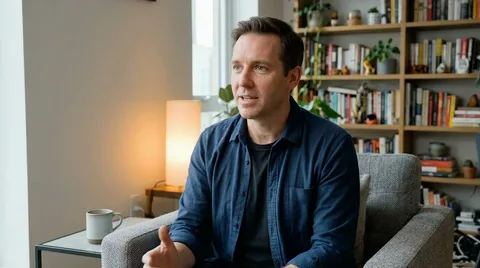
Before: A presenter filmed on a phone as the second cameraBefore
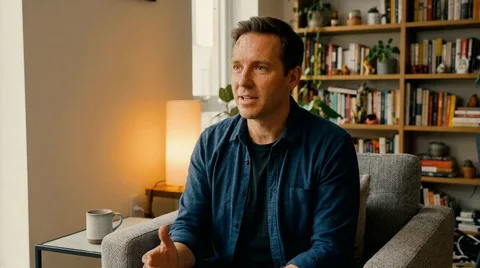
After: A presenter filmed on a phone as the second cameraAfter

AI look: match the warm interview key light of the A camera

To color match video, open the clip you want to change. Then point it at a reference: another clip, such as your A-cam, or a still you have the rights to. The match is a color-statistics transfer in Oklab that runs in your browser, with no AI, no upload and no account. The result is a LUT you can preview, fine-tune and download as a .cube, or render into a graded MP4.

Updated

How it works

  1. 1

    Open the clip to change

    Drop the shot that should move, usually the B-cam or phone clip, and pick its input: Rec.709 or one of the supported log curves.

  2. 2

    Choose the reference

    Pick the A-cam clip or a still to match to. The browser compares lightness and color in both and builds a LUT that moves one toward the other.

  3. 3

    Check, adjust, export

    Compare with the before/after split, trim with exposure, temperature, tint and saturation, then download the .cube at 17, 33 or 65 points or a graded MP4.

Good for

  • A YouTuber matching a phone B-cam to the main camera
  • Two cameras with different white balance on the same interview
  • Matching a clip to a reference still from your own shoot
  • Bringing pickups shot on another day close to the original scene
Before: A presenter filmed on a phone as the second cameraBefore
After: A presenter filmed on a phone as the second cameraAfter
AI look: match the warm interview key light of the A camera

01

How color matching video by statistics works

The match converts both images into Oklab, a color space where equal steps look roughly equal to the eye, and keeps lightness apart from the two color axes. It then measures how each channel is distributed in the source and in the reference, its average and its spread, and builds a mapping that shifts and scales the source so those line up with the reference. In practice that corrects overall brightness, contrast, white balance and saturation in one move. Because it works on statistics rather than recognizing objects, it needs no AI and runs quickly in the browser. The same mapping is baked into a 3D LUT, so the preview, the .cube and the MP4 all show the same result.

02

Pick a reference that shares the scene

A statistics match assumes the two shots contain similar things in similar amounts. Matching a phone close-up to an A-cam close-up from the same setup works well. Matching a shot full of blue sky to an indoor shot pushes the indoor shot blue, because the method cannot tell sky from a color cast. Choose a reference with the same subject, framing and light, and avoid one with large areas of a color the other shot lacks. If the match overshoots, lower the strength slider rather than starting again; a partial match often looks more natural than a full one, especially on skin.

03

What a shot match cannot fix

A match moves color globally, so it cannot correct problems that differ across the frame. If one camera clipped the highlights, the detail is gone and no LUT brings it back. If one shot mixes daylight from a window with warm practical lamps, fixing one area moves the other the wrong way. Phones add their own sharpening, noise reduction and local tone mapping, which no color transform undoes, so a matched phone shot can share the color of the A-cam and still look different in texture. Lock the phone’s exposure and white balance when you shoot and record SDR rather than HDR, and the match has much less work to do.

Credits per job

The cost shows before a job runs. Failed keyframes are refunded. Plans and credit packs

JobCredits
AI lookThree keyframes graded, a LUT fitted in your browser (a still is one keyframe)104 credits
One keyframe againGrade one keyframe again with the same look35 credits
Grade notesThe look explained in colorist terms, to rebuild by hand4 credits
Preset looksFive fixed looks for Rec.709 and log footageFree
Shot matchingMatch a clip to a reference still or another clipFree
.cube and MP4 exportAny look, any size, rendered in your browserFree

Questions

Is color matching free?

Yes. Matching to a reference still or another clip runs in your browser with no account and no AI, and the .cube download is free and unlimited.

Can I match a phone clip to my main camera?

Yes. Open the phone clip, pick the camera clip or a still from it as the reference, and export the LUT or a graded MP4. Shoot the phone in SDR with locked exposure and white balance for a closer match.

Does matching upload my footage?

No. Both clips are decoded and matched in your browser, and nothing from a match is sent to a server.

Does it work with log footage?

Yes. Pick the clip’s input, Rec.709, S-Log3, LogC3 or V-Log, and the LUT is built for that input with Rec.709 output. HDR clips (HLG or PQ) are not supported.

When should I use an AI look instead?

When you want a creative look rather than a match, or when the reference is too different for statistics to carry over well. An AI look grades three keyframes from your clip for 104 credits and fits a LUT with skin protected.